Meshtastic · LoRa Mesh

ATAK over
LoRa Mesh.

LANCE connects ATAK to Meshtastic radios over Bluetooth or USB — carrying positions, markers, shapes, routes, chat, emergencies and more across a resilient off-grid LoRa mesh. No second app, no manual radio setup: the plugin configures the radio for you. When the cellular network is gone, the mesh keeps your common operating picture alive.

No 2nd app needed BLE + USB Offline First
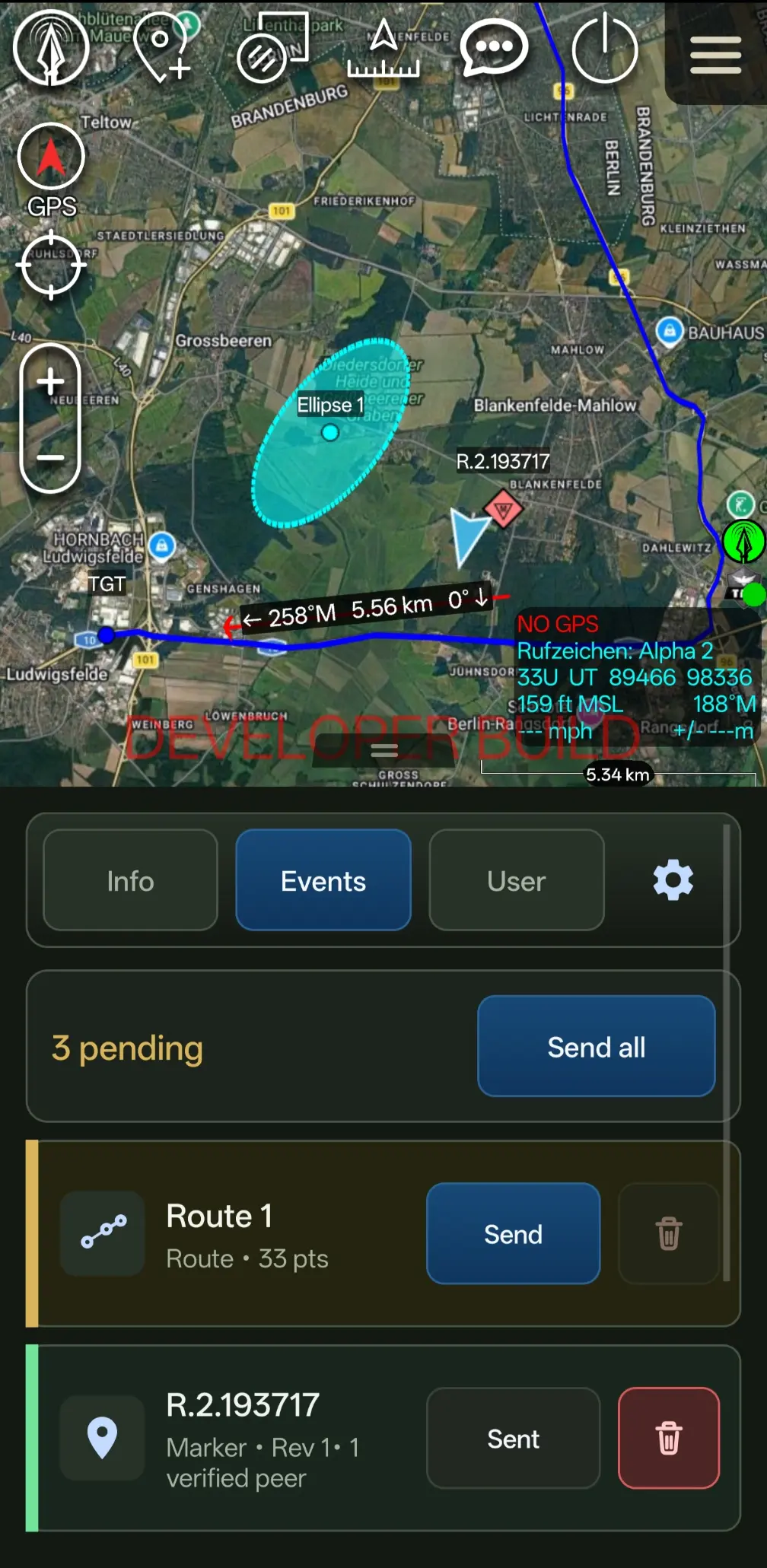
LANCE running inside ATAK — live tactical map synced over the LoRa mesh
PLI SENT
Bravo-2 · 32U PU 8841 6620
MARKER SYNCED
CoT event delivered ✓
No Cellular Network
The problem

When the network drops, the tactical picture goes dark.

ATAK is powerful — but it needs a transport layer. In the field, that layer is the first thing to fail.

No cellular coverage

Operations move beyond the last tower. LTE and Wi-Fi vanish, and standard ATAK servers become unreachable.

Fragmented field comms

Teams fall back to voice and memory. Positions drift, markers are lost, and shared situational awareness breaks down.

ATAK needs resilient transport

The app is ready for the field. What it lacks is a cost-effective, low-bandwidth, infrastructure-free way to move data between clients.

LANCE turns Meshtastic instantly into an ATAK-ready communication layer.

See how it works
Zero-config setup

No second app.
No manual radio tuning.

Most mesh setups make you install and configure a separate app first. LANCE doesn't — it detects the radio, writes the right configuration over the link and verifies it. Connect, open ATAK, go.

Learn more
01

Connect the radio

Pair over Bluetooth, or plug in over USB on Pro and Enterprise.

BLE / USB
02

Open ATAK

Launch ATAK with the LANCE plugin active. No pre-provisioning.

ATAK + LANCE
03

You're on the mesh

LANCE configures and verifies the radio — the link turns green.

LINK GREEN · READY
How it works

From ATAK to the mesh, in four steps.

LANCE · MESHSTEP 01
ATAK · Self PLI
Marker placed
Message drafted
Packaging payload
CoT → mesh148 B
Optimized−68%
LoRa · 3 hops
Remote ATAK synced
Marker received ✓
MESH OKSNR +4.2 dB
01

ATAK creates tactical data

Your position, markers, shapes and range rings are generated inside ATAK exactly as you already work — no new workflow to learn.

  • Self position (PLI)
  • Markers & points
  • Shapes & range rings
  • CoT events
  • …and more
02

LANCE optimizes the payload

LANCE packages ATAK-relevant data into compact "Lite" frames tuned for LoRa — a position update is only ~8 bytes, a marker ~16 — prioritizing field-critical information and stripping everything the mesh can't afford to carry.

  • Compact Lite encoding
  • ⌀ 35 bytes on the air
  • Prioritizes field-relevant data
03

Meshtastic transmits over LoRa

The connected Meshtastic radio forwards each frame across the mesh. Hop-based routing carries it node to node — no internet, no server, no tower required.

  • Mesh routing
  • Hop-based forwarding
  • Zero infrastructure
04

Remote ATAK clients receive updates

On the far side, LANCE rebuilds the data into native ATAK objects. Teammates see your position, markers and messages appear on their own map — fully off-grid.

  • Team visibility restored
  • Marker synchronization
  • Off-grid coordination
Capabilities

Everything LANCE brings to ATAK.

A focused set of capabilities built around the realities of LoRa — small payloads, long range, and no infrastructure.

In the field

Built for disconnected environments.

Versions

Start free. Scale to the mission.

LANCE FREE

Free

Get started, learn the mesh, and run simple off-grid ATAK workflows.

Compare plans
LANCE PRO · RECOMMENDED

For power users

More control, more capabilities and more convenience — custom radio configuration, advanced markers, chat & CASEVAC and expanded tactical tools for teams and regular field operations.

Compare plans
LANCE ENTERPRISE

For organizations

Managed deployment, custom configuration, fleet licensing and dedicated support.

Contact us
Documentation

Know the mesh before the mission.

A complete online wiki and PDF manual: setup guides, LoRa limits, payload sizing, troubleshooting and best practices — so there are no surprises in the field.

GETTING STARTED
Installation
Connecting Meshtastic
ATAK Setup
LIMITS
LoRa Bandwidth
Hop Count
Connecting Meshtastic
InfoPair your radio over BLE before launching ATAK.
# lance.conf
channel: "LongFast"
pli_interval: 120s
hop_limit: 3
Get LANCE

Bring the full ATAK experience into the mesh.

Download LANCE and extend your ATAK setup with resilient off-grid communication over Meshtastic and LoRa.